 兔子API
兔子API
api
Complete Guide to Seedance Video Generation with Real-Person Images
Direct answerUpload images to /v1/seedance/assets using your site API token, explicitly start a compliance review, and wait for every image to become active. Add each reference to the content array of /v1/videos, save the video task ID, and download the result after its status becomes completed.
Updated · Reviewed
Using real-person assets requires access to be enabled by an administrator. Please contact your administrator.
1. Workflow and Prerequisites
For reusable real-person assets with traceable reviews, use the asset library workflow: upload a real-person image → start its review → query the asset until active → create a video using its asset:// reference → query the video until completed → download the result. Upload and review every image that uses this workflow. Direct URL/base64 inputs and their limits are covered in Sections 1.1 and 4.4.
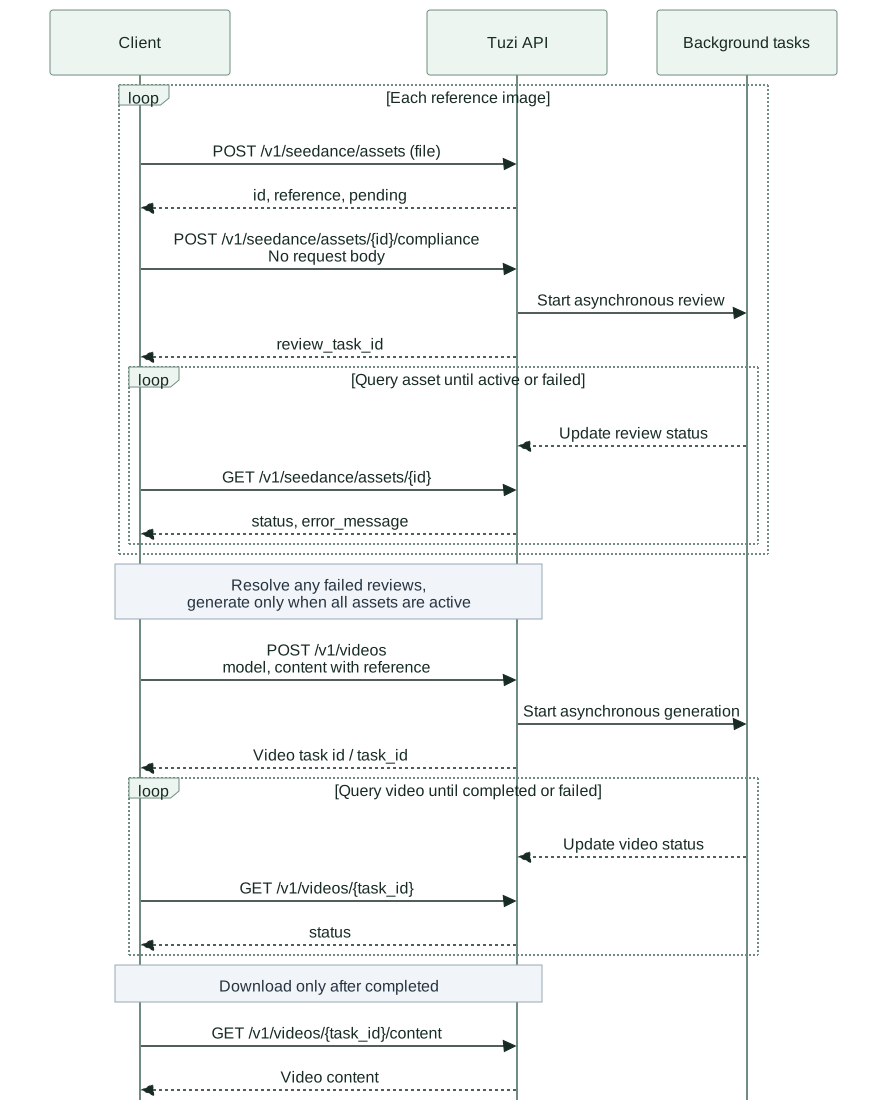
This guide covers the site's unified API. Clients only need the site's Base URL, API token, and model name; the asset service is selected automatically through the token's group. Before starting, check the model catalog to confirm that the model supports /v1/videos, the token has model access and sufficient quota, and its group has real-person asset support enabled. A token assigned to a single fixed group is recommended for initial integration and workflows that need predictable asset reuse.
The official Seedance overview describes the model's multimodal capabilities. Uploads, reviews, asset identifiers, and error structures in this guide follow this site's implementation. A model capability is not necessarily enabled for every group. Examples use doubao-seedance-2-0-260128 to illustrate generation parameters; check the current token and model catalog for actual model names and availability. Upload does not require a model, and approved images can be reused across Seedance models when account ownership, token permissions, group, and configuration requirements are met.
Prepare Bash, curl, jq, and real-person photos you have permission to use. Set BASE_URL to the site's root URL without appending /v1 again. Set these environment variables in your own terminal, and keep API keys out of public code:
export BASE_URL="https://api.tu-zi.com"
export API_KEY="REPLACE_WITH_YOUR_SITE_API_TOKEN"
export MODEL="doubao-seedance-2-0-260128"
1.1 Distinguishing Approved Assets from Raw Images
Keep type=image_url. The prefix of image_url.url selects the input source; role describes how the image is used. No real-person flag is required, and callers cannot declare an image approved.
| Input Source | Example image_url.url | Current Processing |
|---|---|---|
| Asset library reference | asset://0123456789abcdef0123456789abcdef | Validate ownership, group, and active status, then reuse the asset without downloading or uploading it again |
| Direct image URL | https://media.example.com/scene.jpg | Download and upload as a stream, then generate with the uploaded UUID without calling review |
| Image Base64 | data:image/png;base64,... | Decode and upload as a stream, then generate with the uploaded UUID without calling review |
An approved real-person asset used as a reference image:
{"type": "image_url", "role": "reference_image", "image_url": {"url": "asset://0123456789abcdef0123456789abcdef"}}
A regular scene image used as a reference:
{"type": "image_url", "role": "reference_image", "image_url": {"url": "https://media.example.com/scene.jpg"}}
The roles match because both images serve as references; their prefixes select different processing paths. The ID after asset:// must be the site asset ID returned by upload, not an upstream UUID. Changing a URL's prefix does not grant approval. A newly uploaded reference may still be pending; wait for active before generating.
Input source does not identify whether an image contains a person. Approved images without people can use asset://, and HTTP(S)/base64 images can contain people. For real-person images, explicitly upload and review through the asset library until active, then reuse the returned reference. Direct images do not call compliance review; an upstream rejection of a direct real-person image is returned to the caller.
Generation mode is independent of review status. role=reference_image defaults to referToVideo. For generation driven by a single image, use role=first_frame and explicitly set top-level refer_model=imageToVideo. Either use can take approved assets; mode names do not classify people or review status. See Section 4.2 for other modes.
2. Endpoint and Parameter Reference
All endpoints use Authorization: Bearer $API_KEY. Only uploads use multipart/form-data; curl's -F sets the boundary automatically, so do not manually set the upload Content-Type.
| Method | Path | Purpose |
|---|---|---|
| POST | /v1/seedance/assets | Upload one image and create a pending asset |
| POST | /v1/seedance/assets/{id}/compliance | Start a review; no request body required |
| GET | /v1/seedance/assets/{id} | Read the asset and its persisted review status |
| GET | /v1/seedance/assets | List assets accessible to the current token with pagination |
| DELETE | /v1/seedance/assets/{id} | Delete the site's asset record so it can no longer be referenced |
| POST | /v1/videos | Submit a video generation task with a JSON body |
| GET | /v1/videos/{task_id} | Query video status and results |
| GET | /v1/videos/{task_id}/content | Retrieve content after the video completes |
Upload one image using the file form field. Multiple reference images require separate upload requests.
| Parameter | Type | Required | Description |
|---|---|---|---|
file | Binary file | Yes | A nonempty image, up to 30 MiB (31,457,280 bytes). Use JPG, PNG, WebP, GIF, BMP, or TIFF |
Start review by placing the returned asset ID in the compliance endpoint path, with no request body. The server selects the asset service through the token's authorized groups. Do not upload video or audio files through this image endpoint.
3. Upload an Image and Start Its Review
curl --fail-with-body --silent --show-error --max-time 180 \
"$BASE_URL/v1/seedance/assets" \
-H "Authorization: Bearer $API_KEY" \
-F "file=@./portrait.jpg"
Key fields from a sample upload response follow. All example IDs are fictional. Check success before reading data.id and data.reference:
{
"success": true,
"message": "",
"data": {
"id": "0123456789abcdef0123456789abcdef",
"reference": "asset://0123456789abcdef0123456789abcdef",
"asset_type": "image",
"status": "pending",
"error_message": "",
"compliance_started": false,
"review_task_id": "",
"retry_after": 5,
"created_at": 1800000000,
"updated_at": 1800000000,
"last_polled_at": 0
}
}
Place the returned data.id in the path to explicitly start a review. Use only the ID for {id}, without the asset:// prefix:
export ASSET_ID="REPLACE_WITH_DATA_ID_FROM_UPLOAD"
curl --fail-with-body --silent --show-error --max-time 180 \
-X POST "$BASE_URL/v1/seedance/assets/$ASSET_ID/compliance" \
-H "Authorization: Bearer $API_KEY"
curl --fail-with-body --silent --show-error --max-time 60 \
"$BASE_URL/v1/seedance/assets/$ASSET_ID" \
-H "Authorization: Bearer $API_KEY"
Starting a review and querying an asset return the same asset structure. Once review starts, compliance_started=true, and review_task_id can locate the record in task logs. Review continues in the server background. If your client disconnects, resume querying with the original asset ID without uploading again.
| Field or Status | Meaning and Next Step |
|---|---|
pending | Review has not started or is in progress; check compliance_started. The asset cannot yet be used for generation |
active | Review passed; the asset can be referenced when account ownership, group, permission, and configuration requirements are met |
failed | Review failed or processing timed out. Read error_message, address the cause, then decide whether to retry review or use another image |
deleted | Terminal status returned by deletion. Subsequent queries usually return 404, and the asset is excluded from lists |
reference | The full asset://... string used for generation, not an image download URL |
retry_after | Suggested polling interval, currently 5 seconds. You may add random jitter and an overall deadline |
created_at / updated_at / last_polled_at | Unix timestamps in seconds; last_polled_at=0 means the asset has not yet been polled |
error_message | Asset processing error description. Use status to determine whether processing has ended |
Asset endpoints can return HTTP 200 with success=false, for example {"success":false,"message":"当前令牌未配置可用素材适配器"} (no usable asset adapter is configured for the current token). curl --fail-with-body only catches HTTP errors; application code must also check success. While an asset is pending, poll with GET rather than repeatedly posting review requests.
3.1 When the Real-Person Photo Is at a Remote URL
Download the photo to a local file, then upload it and start review as described in this section. Do not send your site's API token when downloading an external image:
export IMAGE_URL="https://media.example.com/portrait.jpg"
curl --fail-with-body --silent --show-error --location \
--proto '=https' --proto-redir '=https' \
--connect-timeout 15 --max-time 120 --max-filesize 31457280 \
"$IMAGE_URL" --output ./portrait.jpg
Replace the example with your image URL. After confirming a successful download, upload with -F "file=@./portrait.jpg" from Section 3 and start review. The upload endpoint accepts file contents; a URL string is not a replacement for the file field.
4. Generate a Video from Approved Assets
Use the reference from an asset response whose status is active. This example uses the person as a reference and explicitly sets refer_model=referToVideo. For single-image imageToVideo, choose the use described in Sections 1.1 and 4.2. Real-person images do not require a separate video endpoint:
export ASSET_REFERENCE="asset://REPLACE_WITH_APPROVED_ASSET_ID"
jq -n --arg model "$MODEL" --arg ref "$ASSET_REFERENCE" '{
model: $model,
content: [
{type: "text", text: "The person in the reference image looks naturally at the camera and says in Chinese: 大家好,很高兴认识你,希望我们一起发现更多精彩。 Keep the appearance and clothing consistent, with natural lip movements."},
{type: "image_url", role: "reference_image", image_url: {url: $ref}}
],
refer_model: "referToVideo",
duration: 8,
ratio: "9:16",
resolution: "720P",
generate_audio: true
}' > video-request.json
curl --fail-with-body --silent --show-error --max-time 180 \
"$BASE_URL/v1/videos" \
-H "Authorization: Bearer $API_KEY" \
-H "Content-Type: application/json" \
--data-binary @video-request.json
| Parameter | Type | Usage and Constraints in This Guide |
|---|---|---|
model | string | Required for generation; select a Seedance model available to the token |
content | array | Include a nonempty text item and reference items in the intended reference order |
content[].type | string | text, image_url, video_url, or audio_url |
content[].text | string | Text prompt describing character actions, dialogue, visuals, sound, and the purpose of each reference |
content[].role | string | reference_image for reference images, first_frame / last_frame for frames, reference_video for videos, and reference_audio for audio; omit for text items. This field does not identify people or review status |
content[].image_url.url | string | An HTTP(S) image URL, a standard data:image/<mime>;base64,... image data URI, or an approved asset://... reference; all can be used in one request. See Section 4.4 for direct inputs and upstream rejection handling |
image / input_reference | string or string[] | Top-level image aliases sharing the source handling and size limits of content[].image_url.url; direct images do not call review, and asset-library references must be active. Use content when order and roles matter |
images / images_url | string[] | Top-level image arrays accepting the same HTTP(S), image data URI, and asset:// values |
content[].video_url.url | string | An HTTP(S) video URL accessible to the server; HTTPS is recommended. Image asset IDs cannot be used |
content[].audio_url.url | string | An HTTP(S) audio URL accessible to the server; HTTPS is recommended. Image asset IDs cannot be used |
duration | integer | Video length in seconds, for example 8. Seedance 2.0 models accept 4–15 seconds and 2.5 accepts 4–30 seconds; defaults to 5 seconds when omitted |
ratio | string | 9:16 portrait or 16:9 landscape in the examples. Set it explicitly; other ratios depend on model support |
resolution | string | 720P in the example and as the current default; other resolutions depend on the selected model |
generate_audio | boolean | Whether to generate an audio track; explicitly true in the example. false disables it; the current integration defaults to true when omitted |
count | integer | Optional; the current integration only supports 1. Submit separate tasks for additional creations |
When using an asset library reference, complete that asset's upload and review first. See Section 4.4 for direct raw-image processing, limits, and logging differences.
4.1 Passing Parameters to /v1/videos
Put generation parameters at the JSON top level and media items in content. In addition to the common parameters above, you can specify a prompt, reference mode, and output format:
| Parameter | Type | Usage |
|---|---|---|
prompt | string | An alternative to a text item in content; use one of these styles and provide a nonempty prompt |
refer_model | string | Select one of the modes below; when omitted, the mode is inferred from the media |
output_format | string | For 2.5 only: mp4 or mov. Omit to use the service's default output format |
Example using a top-level prompt for text-only generation. Set the environment variables from Section 1, then call directly without uploading an image:
jq -n --arg model "$MODEL" '{
model: $model,
prompt: "Early morning by the sea, with the camera slowly moving closer. No subtitles.",
resolution: "720P",
ratio: "16:9",
duration: 8,
refer_model: "textToVideo",
generate_audio: false,
count: 1
}' | curl --fail-with-body --silent --show-error --max-time 180 \
"$BASE_URL/v1/videos" \
-H "Authorization: Bearer $API_KEY" \
-H "Content-Type: application/json" \
--data-binary @-
4.2 Reference Modes and Resolution Choices
refer_model | Required Media | Additional 2.5 Requirements |
|---|---|---|
textToVideo | No images, videos, or audio; still provide a nonempty prompt | None |
referToVideo | At least 1 reference; up to 15 for 2.0 models or 50 for 2.5, also respecting each media type's count limit | None |
imageToVideo | Exactly 1 image, with no other media | ratio=adaptive |
firstAndLastFrame | Exactly 2 images, with no other media; order them as first frame, then last frame | ratio=adaptive |
videoExtend | Exactly 1 video; only supported with Seedance 2.5 | Explicit refer_model=videoExtend, ratio=adaptive, and duration from 4 to 30 seconds |
Mode values are case-sensitive. When omitted, no media selects text-to-video; one image without a reference role selects image-to-video; two images without reference roles select first/last-frame generation; a reference_* role or a video/audio item selects reference generation. For multiple reference images, explicitly use refer_model=referToVideo and role=reference_image.
Video extension requires explicit refer_model=videoExtend; one video with role=reference_video does not select extension automatically. The upstream provider's videoEdit and count=2/4 capabilities are not integrated into this site. This site currently supports only count=1.
Choose a resolution and ratio supported by the selected model and your token's group:
| Model Family | resolution Choices | Other Limits |
|---|---|---|
| Seedance 2.5 | 480P, 720P, 1080P | Ratios: adaptive, 21:9, 16:9, 4:3, 1:1, 3:4, 9:16; accepts output_format |
| Seedance 2.0 | 480P, 720P, 1080P, 4K, SUPER_720P, SUPER_1080P, SUPER_4K | Ratios: 21:9, 16:9, 4:3, 1:1, 3:4, 9:16 |
| Seedance 2.0 Fast / Mini | 480P, 720P, SUPER_720P, SUPER_1080P, SUPER_4K | Same ratios as 2.0; SUPER_* indicates super-resolution output |
The default resolution is 720P. The default ratio is 16:9 for 2.0 models and adaptive for 2.5. High resolution and super-resolution require support from your group.
4.3 2.5 Examples: One Image, First/Last Frames, and Output Format
The following JSON combines one real-person image, no audio, and MOV output. First confirm that the example model is available. You can reuse an approved image previously used with 2.0 when it belongs to the same account, remains accessible to the token, matches the actual generation group, and has a valid configuration binding. Switching to 2.5 alone does not require another upload or review; changing the group or asset service configuration may require one.
{
"model": "doubao-seedance-2-5-260628",
"prompt": "The person in the reference image smiles naturally and waves at the camera. Keep their appearance consistent.",
"content": [
{"type": "image_url", "role": "first_frame", "image_url": {"url": "asset://0123456789abcdef0123456789abcdef"}}
],
"refer_model": "imageToVideo",
"resolution": "720P",
"ratio": "adaptive",
"duration": 8,
"generate_audio": false,
"output_format": "mov",
"count": 1
}
For first/last-frame generation, use the following request. Put the first frame before the last frame in the array and complete review for both images:
{
"model": "doubao-seedance-2-5-260628",
"prompt": "Transition naturally from the first frame to the last while keeping the person's identity and clothing consistent.",
"content": [
{"type": "image_url", "role": "first_frame", "image_url": {"url": "asset://0123456789abcdef0123456789abcdef"}},
{"type": "image_url", "role": "last_frame", "image_url": {"url": "asset://fedcba9876543210fedcba9876543210"}}
],
"refer_model": "firstAndLastFrame",
"resolution": "720P",
"ratio": "adaptive",
"duration": 8,
"generate_audio": false,
"output_format": "mp4",
"count": 1
}
Save either JSON as video-request.json, submit it with the curl --data-binary @video-request.json call from Section 4, then query and download as described in Section 5. Save MOV output with a .mov extension. Do not combine every example parameter indiscriminately or use the output format field with 2.0 models.
4.4 Regular Image URLs and Mixed References
image_url.url also accepts a regular HTTP(S) image URL. This complete example sends a URL directly; replace it with an image file that the server can download:
export IMAGE_URL="https://media.example.com/scene.jpg"
jq -n --arg model "$MODEL" --arg image "$IMAGE_URL" '{
model: $model,
content: [
{type: "text", text: "Use the scene in the reference image with a slow camera push-in and natural lighting."},
{type: "image_url", role: "reference_image", image_url: {url: $image}}
],
duration: 8,
ratio: "16:9",
resolution: "720P",
generate_audio: true
}' | curl --fail-with-body --silent --show-error --max-time 180 \
"$BASE_URL/v1/videos" \
-H "Authorization: Bearer $API_KEY" \
-H "Content-Type: application/json" \
--data-binary @-
Direct ordinary images do not call compliance review. The gateway downloads or decodes and uploads each image as a stream, then submits the uploaded UUID without calling /openapi/assetLibrary/compliance/check or waiting for a review status. URL/base64 describes the input source, not whether an image contains a person. For real-person images, complete asset-library review and use asset://. If a direct real-person image is rejected upstream, the submission error is returned; asynchronous rejection appears in the video's task failure reason.
Direct inputs create neither a site asset record nor a review_task_id; there is no separate asset review task or background continuation after the request times out. For reusable assets, longer reviews, or retained review records, explicitly upload and review through Section 3, then use asset://. Keep the Request-ID and inspect submission errors or asynchronous task failure reasons. Successful video submission means accepted, not completed; keep querying until completed.
The following complete JSON sends an image data URI directly. The iVBORw0KGgo... value only abbreviates a standard PNG's Base64 content; replace it with the complete encoding in a real request:
{
"model": "doubao-seedance-2-0-260128",
"content": [
{"type": "text", "text": "Keep the reference subject intact, with only a gentle camera push-in and natural lighting changes."},
{"type": "image_url", "role": "reference_image", "image_url": {"url": "data:image/png;base64,iVBORw0KGgo..."}}
],
"duration": 4,
"ratio": "16:9",
"resolution": "480P",
"generate_audio": false
}
Only image data URIs with a MIME prefix are accepted: data:image/png;base64,..., data:image/jpeg;base64,..., and similar values. Bare Base64 without the data:image/...;base64, prefix, plus data:video/... and data:audio/..., are unsupported. The gateway decodes and uploads the image as a stream without writing it to disk. The decoded image is limited to 30 MiB per item and is also bounded by MAX_FILE_DOWNLOAD_MB, the per-request remote-media budget, and the /v1/videos ingress request-body limit. Base64 expands the request body, so the ingress limit can be reached before the decoded 30 MiB limit.
You can combine an approved person reference with a regular scene image URL in the same request. Use the following JSON with Section 4's submission call. The person reference reuses its approved UUID; the scene URL is uploaded and checked for ACTIVE before its UUID is used. The upstream service can still reject material during submission or generation.
{
"model": "doubao-seedance-2-0-260128",
"content": [
{"type": "text", "text": "The person in the first image walks naturally through the scene in the second image. Keep the person's appearance consistent."},
{"type": "image_url", "role": "reference_image", "image_url": {"url": "asset://0123456789abcdef0123456789abcdef"}},
{"type": "image_url", "role": "reference_image", "image_url": {"url": "https://media.example.com/scene.jpg"}}
],
"duration": 8,
"ratio": "16:9",
"resolution": "720P",
"generate_audio": true
}
Use a direct file URL, not a web page, Markdown link, or login-protected address. Do not include the site's API token in the URL. The top-level image, images, images_url, input_reference, and content[].image_url.url image forms share this same processing path. Keep URLs valid while the request is processed, follow the site's download policy, and stay within the 30 MiB per-image limit; data URIs must also leave room for Base64 request-body overhead. After submission succeeds, query and download as described in Section 5.
4.5 Extend a Video with Seedance 2.5
To continue creating from an existing video, select Seedance 2.5 and explicitly pass refer_model=videoExtend. Set BASE_URL and API_KEY from Section 1, then replace VIDEO_URL with an HTTPS video file URL that the server can download directly:
export VIDEO_URL="https://media.example.com/source.mp4"
jq -n --arg video "$VIDEO_URL" '{
model: "doubao-seedance-2-5-260628",
content: [
{type: "text", text: "Continue the scene and subject movement with a steady camera push-in, preserving the visual style."},
{type: "video_url", role: "reference_video", video_url: {url: $video}}
],
refer_model: "videoExtend",
ratio: "adaptive",
duration: 5,
resolution: "480P",
generate_audio: false,
output_format: "mp4",
count: 1
}' | curl --fail-with-body --silent --show-error --max-time 180 \
"$BASE_URL/v1/videos" \
-H "Authorization: Bearer $API_KEY" \
-H "Content-Type: application/json" \
--data-binary @-
This mode requires exactly 1 video, ratio=adaptive, and a duration from 4 to 30 seconds. Negative values, including -1, are rejected. The example's duration=5 is the generation parameter; it does not guarantee that the returned result concatenates the original video and newly generated content. Image asset:// references, bare Base64, and video data URIs cannot be used as the extension video input. Omitting refer_model still selects referToVideo.
These are upstream input-video requirements. They do not imply that the gateway probes and validates every media property locally:
| Property | Upstream Requirement |
|---|---|
| Format and file size | MP4 or MOV, up to 200 MiB per video |
| Duration and frame rate | 1–31 seconds, up to 60 fps |
| Width and height | Each from 300 to 6000 pixels |
| Pixel area | Width × height from 409600 to 8295044 |
| Aspect ratio | From 2:5 to 5:2 |
The site's MAX_FILE_DOWNLOAD_MB and combined per-request media budget also apply, and can impose a limit below 200 MiB. Save the returned id or task_id, then query until completed and download as described in Section 5. An accepted submission does not mean generation is complete.
5. Query the Video Task and Download the Result
Unlike asset responses, video responses place fields at the top level without a data wrapper. Example creation response:
{
"id": "task_example_video",
"task_id": "task_example_video",
"object": "video",
"model": "doubao-seedance-2-0-260128",
"status": "queued",
"progress": 0,
"created_at": 0
}
export VIDEO_TASK_ID="REPLACE_WITH_ID_OR_TASK_ID_FROM_CREATION"
curl --fail-with-body --silent --show-error --max-time 60 \
"$BASE_URL/v1/videos/$VIDEO_TASK_ID" \
-H "Authorization: Bearer $API_KEY"
queued means waiting, in_progress means generating, completed means successful, and failed means unsuccessful. progress is a progress indicator and must not be used alone to determine success. The initial submission response may have created_at=0; use the persisted task information from subsequent queries. On completion, fields such as video_url and completed_at become available; on failure, check the response error if present and the task logs. The asset review status active, task log status SUCCESS, and video API status completed belong to different status systems.
Download only after completed, saving the binary response to a file rather than printing it to the terminal:
curl --fail-with-body --silent --show-error --location \
--max-time 300 --max-filesize 536870912 \
"$BASE_URL/v1/videos/$VIDEO_TASK_ID/content" \
-H "Authorization: Bearer $API_KEY" \
--output self-introduction.mp4
You may also download from the returned video_url; do not attach your site API token when downloading an external media URL. Result URLs can expire, so save results promptly. A creation request timeout does not mean the task was rejected. Check task logs or the saved task ID before resubmitting, to avoid duplicate tasks and charges.
6. Complete Script for One or Multiple Images
The script below connects upload, review, generation, polling, and download. It defaults to portrait.jpg in the current directory. For multiple images, add file paths to IMAGES; the script uploads and reviews each image, then submits a single video task only after every image passes. First set the three environment variables from Section 1. The generated JSON files are business records containing asset IDs, review task IDs, and video task IDs; keep them in a private directory.
#!/usr/bin/env bash
set -euo pipefail
umask 077
: "${BASE_URL:?Set BASE_URL first}"
: "${API_KEY:?Set API_KEY first}"
: "${MODEL:?Set MODEL first}"
BASE_URL="${BASE_URL%/}"
IMAGES=("./portrait.jpg")
# Multiple references: IMAGES=("./front.jpg" "./side.jpg")
for image in "${IMAGES[@]}"; do test -f "$image"; done
WORK_DIR=$(mktemp -d "./seedance-run.XXXXXX")
printf 'Records: %s\n' "$WORK_DIR"
api() {
curl --fail-with-body --silent --show-error \
--connect-timeout 15 --max-time 180 \
-H "Authorization: Bearer $API_KEY" "$@"
}
asset_ok() {
jq -e '.success == true and (.data | type == "object")' "$1" >/dev/null || {
jq '{success, message}' "$1" >&2
return 1
}
}
printf '[]\n' > "$WORK_DIR/references.json"
index=0
for image in "${IMAGES[@]}"; do
index=$((index + 1))
record="$WORK_DIR/asset-$index.json"
api "$BASE_URL/v1/seedance/assets" \
-F "file=@$image" > "$record"
asset_ok "$record"
asset_id=$(jq -er '.data.id | select(type == "string" and length > 0)' "$record")
printf 'Asset: %s\n' "$asset_id"
api -X POST "$BASE_URL/v1/seedance/assets/$asset_id/compliance" \
> "$WORK_DIR/review-$index.json"
asset_ok "$WORK_DIR/review-$index.json"
jq -r '.data.review_task_id' "$WORK_DIR/review-$index.json"
deadline=$((SECONDS + 1800))
while true; do
api "$BASE_URL/v1/seedance/assets/$asset_id" > "$record"
asset_ok "$record"
state=$(jq -r '.data.status' "$record")
case "$state" in
active) break ;;
failed|deleted) jq '.data | {id, status, error_message, review_task_id}' "$record" >&2; exit 1 ;;
pending) ;;
*) printf 'Unknown asset state: %s\n' "$state" >&2; exit 1 ;;
esac
if (( SECONDS >= deadline )); then
printf 'Review wait timed out; resume GET for %s\n' "$asset_id" >&2
exit 1
fi
sleep $((5 + RANDOM % 3))
done
reference=$(jq -er '.data.reference' "$record")
jq --arg ref "$reference" '. + [$ref]' "$WORK_DIR/references.json" \
> "$WORK_DIR/references.next.json"
mv "$WORK_DIR/references.next.json" "$WORK_DIR/references.json"
done
jq -n --arg model "$MODEL" --slurpfile refs "$WORK_DIR/references.json" '{
model: $model,
content: ([{type: "text", text: "The same person shown in the reference images looks naturally at the camera and says in Chinese: 大家好,很高兴认识你,希望我们一起发现更多精彩。 Keep the appearance and clothing consistent, with natural lip movements."}]
+ ($refs[0] | map({type: "image_url", role: "reference_image", image_url: {url: .}}))),
duration: 8, ratio: "9:16", resolution: "720P", generate_audio: true
}' > "$WORK_DIR/video-request.json"
api "$BASE_URL/v1/videos" -H "Content-Type: application/json" \
--data-binary "@$WORK_DIR/video-request.json" > "$WORK_DIR/video-submit.json"
task_id=$(jq -er 'select(.error == null and .success != false) | (.id // .task_id) | select(type == "string" and length > 0)' "$WORK_DIR/video-submit.json")
printf 'Video task: %s\n' "$task_id"
deadline=$((SECONDS + 1800))
while true; do
api "$BASE_URL/v1/videos/$task_id" > "$WORK_DIR/video-status.json"
state=$(jq -er 'select(.error == null or .status == "failed") | .status' "$WORK_DIR/video-status.json")
case "$state" in
completed) break ;;
failed) jq '{id, status, error}' "$WORK_DIR/video-status.json" >&2; exit 1 ;;
queued|in_progress) ;;
*) printf 'Unknown video state: %s\n' "$state" >&2; exit 1 ;;
esac
if (( SECONDS >= deadline )); then
printf 'Video wait timed out; resume GET for %s\n' "$task_id" >&2
exit 1
fi
sleep $((5 + RANDOM % 6))
done
api --location --max-time 300 --max-filesize 536870912 \
"$BASE_URL/v1/videos/$task_id/content" \
--output "$WORK_DIR/video.mp4.part"
mv "$WORK_DIR/video.mp4.part" "$WORK_DIR/video.mp4"
printf 'Completed: %s/video.mp4\n' "$WORK_DIR"
The script stops on HTTP errors, application errors, review failures, or timeouts and does not automatically resubmit creation requests. Its 30-minute wait limit is a client policy, not a completion-time commitment. Keep the records after a timeout and continue querying the original ID. On 429, wait according to Retry-After and resume GET polling; do not restart upload and generation to recover progress.
7. Multiple Images with Video and Audio References
Each image uploaded and submitted for review through the asset library has its own id, reference, and review_task_id; direct URL/base64 inputs do not return these local identifiers. Explicitly set role=reference_image even for two reference images: without a role, the current integration may interpret them as first and last frames. Explain each reference's purpose in the prompt, such as using the first image for the person and the second for clothing or scenery. For multiple people, specify each person's position and actions to avoid conflicting descriptions.
This workflow currently accepts up to 9 images, 3 videos, and 3 audio references through the Seedance 2.0 integration; the corresponding limits for 2.5 are 30, 10, and 10. Actual combinations also depend on the model, file sizes, and group capabilities. These limits do not guarantee that every possible combination will succeed.
Use JPEG, PNG, WebP, BMP, TIFF, or GIF images, MP4 or MOV reference videos, and MP3 or WAV reference audio. Keep each image within 30 MiB. For 2.0 Mini, also keep all reference images within 64 MiB combined. Keep video and audio references short and within the target model's duration limits.
Standard 2.0, Fast, and Mini accept reference videos up to 50 MiB each through this API. For 2.5, the maximum is 200 MiB per video, subject to the site's download limit. Reference audio is limited to 15 MiB per file. Remote media in one request has a default combined limit of 200 MiB; your administrator can confirm the active site limits. Approved asset:// images do not consume this download budget.
The following request keeps two approved images and adds video and audio references. Replace every example URL and asset ID. For an image-only request, remove the video and audio items. URLs must point to media files, not web pages or Markdown links:
{
"model": "doubao-seedance-2-0-260128",
"content": [
{"type": "text", "text": "Use the person in the first image as the main character, the clothing and setting from the second image, the dance movements from the reference video, and the rhythm from the reference audio. The person dances naturally at center stage while the camera slowly moves closer."},
{"type": "image_url", "role": "reference_image", "image_url": {"url": "asset://0123456789abcdef0123456789abcdef"}},
{"type": "image_url", "role": "reference_image", "image_url": {"url": "asset://fedcba9876543210fedcba9876543210"}},
{"type": "video_url", "role": "reference_video", "video_url": {"url": "https://media.example.com/dance.mp4"}},
{"type": "audio_url", "role": "reference_audio", "audio_url": {"url": "https://media.example.com/music.mp3"}}
],
"duration": 8,
"ratio": "16:9",
"resolution": "720P",
"generate_audio": true
}
Submit this JSON as the body of POST /v1/videos, then query as described in Section 5. generate_audio=true enables an output audio track; it does not require an audio reference or guarantee an exact voice match.
8. List, Reuse, and Delete Assets
curl --fail-with-body --silent --show-error --get \
"$BASE_URL/v1/seedance/assets" \
-H "Authorization: Bearer $API_KEY" \
--data-urlencode "status=active" \
--data-urlencode "page=1" --data-urlencode "size=20"
# Delete only when this reference is no longer needed.
curl --fail-with-body --silent --show-error \
-X DELETE "$BASE_URL/v1/seedance/assets/$ASSET_ID" \
-H "Authorization: Bearer $API_KEY"
| List Parameter | Default | Description |
|---|---|---|
status | No filter | Optional; typically pending, active, or failed |
page | 1 | Positive integer starting at 1 |
size | 20 | Positive integer, up to 100 |
List responses contain data.items, data.total, data.page, and data.size. Asset objects use the same structure as the detail endpoint. Successful deletion returns {"success":true,"message":"","data":{"id":"ASSET_ID","status":"deleted"}}. Deletion does not imply that generated videos are canceled or that all copies in external storage are physically erased.
Assets belong to the uploading account and remain subject to the current token's authorized groups. Generation also requires permission to use the target model. Other tokens in the same account must meet these requirements; knowing an ID alone does not grant access. An approved asset can be reused across Seedance models without another review, provided its bound group equals the group ultimately selected for generation and its asset service configuration remains valid. For tokens with multiple groups, auto, or a default group, the server selects a group according to permissions and routing rules. After asset service configuration changes or permission revocation, a historical active status does not guarantee that an asset remains usable.
9. Review Logs, Asset UUIDs, and Troubleshooting
After starting a review through the asset library, open task logs, select asset review in the type filter, and enter the asset response's review_task_id in the task ID filter. Direct URL/base64 processing does not call review and therefore has no separate review task. Retain the generation request's Request-ID and, after acceptance, its video task ID. Check the submission error or video task failure reason for upstream rejection.
If media download, type validation, upload, or request-body construction fails, no video task may exist yet, but the gateway still writes a zero-quota error usage log. Query /log/get-request?id=<Request-ID> to retrieve the redacted reason; these failures do not create video charges.
Asset review records in task logs retain the review task ID, status, asset ID, and asset:// reference. Administrator diagnostics can show the upstream asset UUID and review status. Ordinary API clients only need to persist this association: business record → asset id/reference → review_task_id → video id/task_id. Do not query the video endpoint with a review task ID or construct a site asset reference from the upstream UUID shown in administrator diagnostics.
| Symptom or Error | Resolution |
|---|---|
HTTP 200 with success=false | The asset operation failed. Read message and do not proceed to generation |
当前令牌未配置可用素材适配器 (no usable asset adapter for the current token) | Check the token's groups, model access, and group asset capability; ask an administrator to address configuration |
pending with compliance_started=false | Review has not started; call compliance once |
Review failed | Use error_message to decide whether to replace the image or address a service issue; do not retry indefinitely |
| Asset does not belong to the current generation group | Check the actual upload and video routing; use a stable single-group token and upload again when needed |
| Invalid asset configuration binding | Confirm the current group's asset service configuration. Upload and review again if that binding has changed; switching Seedance models alone does not require another review |
| 401 / 403 | Check token validity, account permissions, and model access |
| 404 | Check whether you used an asset ID or a video task ID, and verify ownership, current permissions, and deletion status |
| 429 | Follow Retry-After and reduce upload, submission, or polling frequency |
| Image too large or invalid file content | Keep each image within 30 MiB and check its actual format; changing the extension alone does not fix it |
| Video creation reports a configuration or billing-rule error | Save the redacted error and Request-ID, then contact an administrator. Switching to another available Seedance model does not itself require another upload or review; account, group, permission, and configuration requirements still apply |
When a submission outcome is uncertain, query existing tasks first and record the response Request-ID for troubleshooting. Passing image review only makes the asset available; video prompts and generated results may still fail review. See the Video Task API, Asynchronous Task Guide, and Troubleshooting Guide for more details.
Use cases
- Generate a talking-head or self-introduction video from approved real-person photos
- Reuse multiple character reference images and combine video and audio references
- Find review logs, asset identifiers, and video generation results
API protocols
/v1/seedance/assets/v1/seedance/assets/{id}/v1/seedance/assets/{id}/compliance/v1/videos/v1/videos/{task_id}/v1/videos/{task_id}/content
FAQ
Why can I not generate a video immediately after uploading an image?
A successful upload only creates a pending asset. Call POST /v1/seedance/assets/{id}/compliance, then query the asset until status=active. GET requests and list requests do not start a review automatically.
How do I use multiple reference images?
For asset-library images, upload and review each image until active, then add its asset:// reference to content with type=image_url and role=reference_image. Regular images can also use direct HTTP(S) URLs or image data URIs. Approved references must belong to the account and actual generation group, with valid token permissions and asset service configuration.
Are the asset ID, review task ID, and video task ID the same?
No. Use the asset id to query or delete the asset, reference to generate videos, review_task_id to trace review logs, and the id or task_id from video creation to query the video. Administrators can inspect the upstream asset UUID in review task diagnostics; API clients do not need that UUID.
Can I use an approved image with another model or group?
Approved images can be reused across Seedance models without another review when account ownership, token permissions, the actual generation group, and asset service configuration remain valid. Assets are bound to the selected group, not to an upload model. Changing groups or configuration may require another upload and review; cross-group references are rejected. A token with multiple groups does not guarantee the same group for upload and generation.
Can I pass a regular image URL?
Yes. content[].image_url.url accepts HTTP(S) image URLs and data:image/...;base64,... image data URIs, mixed with asset:// references if needed. The gateway downloads or decodes and uploads each image as a stream, then generates with the uploaded UUID without calling compliance review. For real-person images, complete asset-library review and use asset://. If a direct real-person image is rejected upstream, the upstream error is returned. Bare base64 and video/audio data URIs are unsupported.
Do approved real-person assets and regular images need different types or roles?
No. type=image_url denotes an image. The asset:// prefix denotes a site asset reference, while HTTP(S) and image data URIs denote raw image inputs. Review status comes from server records. The role describes reference, first-frame, or last-frame use, not whether the image contains a person or has passed review. Approved images without people can also use asset://; a portrait URL is not automatically an approved reference.
How do I extend a video with Seedance 2.5?
Call /v1/videos with explicit refer_model=videoExtend, ratio=adaptive, exactly one type=video_url direct video URL, and duration from 4 to 30 seconds. Omitting refer_model keeps video inputs in referToVideo mode and does not automatically extend them. Image asset:// references and video base64 are not accepted. This site only supports count=1; upstream videoEdit and count=2/4 capabilities are not integrated. See Section 4.5 for a complete example.